


My Session Agenda for ConnectED 2015
This below is my session agenda I made for IBM ConnectED 2015.
For many of attendees, one of important session will be related about IBM Verse. My other buzzwords are bluemix integration, Domino API, Connections API, and of course XPages! like below:
- IBM Verse: Deep Dive and Futures - ID114
- IBM Domino Applications in Bluemix - AD201
- Be Open - Use WebServices And REST In XPages Applications - BP108
- There's an API for That! Why and How To Build on the IBM Connections Platform - BP205
This year also has a lot of great session as usual. I cannot wait! :-)
2015.01.25(Sun)
IBM Domino Applications on Cloud - MAS104
03:45 午後 - 04:45 午後 - Walt Disney World Swan, Swan 7-10
Pete Janzen (IBM), Christian Guedemann (WebGate Consulting AG)
2015.01.26(Mon)
IBM ConnectED - A New Way to Engage - OGS101
08:00 午前 - 09:30 午前 - Walt Disney World Swan, Swan 1-10
IBM Verse: Deep Dive and Futures (R1) - ID114
10:45 午前 - 11:45 午前 - Walt Disney World Swan, Swan 5-6
Andrew Davis (IBM)
IBM Domino - 2015 and Beyond (R1) - ID107
01:00 午後 - 02:00 午後 - Walt Disney World Swan, Swan 5-6
Scott Vrusho (IBM)
IBM Domino Applications in Bluemix - AD201
02:15 午後 - 03:15 午後 - Walt Disney World Dolphin, S. Hem 2
Martin Donnelly (IBM)
The Future of Web Development - Write Once, Run Everywhere with AngularJS and Domino - BTE102
03:45 午後 - 04:45 午後 - Walt Disney World Swan, Toucan 1-2
Mark Roden (PSC Group LLC)
IBM Verse AppDev and Extensibility - AD104
05:00 午後 - 06:00 午後 - Walt Disney World Swan, Swan 7-10
Andrew Davis (IBM)
2015.01.27(Tue)
ConnectED 2015 IBM Business Partner Kickoff Session - BPO101
08:00 午前 - 10:15 午前 - Walt Disney World Swan, Swan 5-6
Lou Sassano (IBM)
IBM Domino App Dev Futures - AD101
08:00 午前 - 09:00 午前 - Walt Disney World Swan, Swan 7-10
Eamon Muldoon (IBM)
There's an API for That! Why and How To Build on the IBM Connections Platform - BP205
09:15 午前 - 10:15 午前 - Walt Disney World Dolphin, S. Hem 2
Mikkel Flindt Heisterberg (OnTime by Intravision)
Take to the Cloud! Extend Your Applications with IBM Sametime APIs from IBM Connections Cloud - AD204
11:15 午前 - 12:15 午後 - Walt Disney World Swan, Swan 1-2
Brendan Arthurs (IBM)
IBM Notes Applications to the Web: IBM Notes Browser Plug-in - ID106
01:00 午後 - 02:00 午後 - Walt Disney World Dolphin, S. Hem 1
Rajesh Patil (IBM)
Adding Two Factor Authentication to IBM Connections Cloud - BTE202
02:30 午後 - 03:30 午後 - Walt Disney World Swan, Swan 7-10
Stephen McDonagh (AVX Limited)
Practical IBM Notes and Domino Internet Security - BP102
03:45 午後 - 04:45 午後 - Walt Disney World Swan, Swan 1-2
Daniel Nashed (Nash!Com)
Be Open - Use WebServices And REST In XPages Applications - BP108
05:00 午後 - 06:00 午後 - Walt Disney World Swan, Toucan 1-2
Bernd Hort (assono GmbH)
OpenNTF Domino API: The Community API - CHALK102
06:15 午後 - 07:00 午後 - Walt Disney World Swan, Swan 1-2
Paul Withers (Intec Systems Ltd)
2015.01.28(Wed)
XPages and Java: Share your Experience - CHALK405
07:15 午前 - 08:15 午前 - Walt Disney World Dolphin, S. Hem 2
Bernd Hort (assono GmbH)
From XPages Hero To OSGi Guru: Taking The Scary Out Of Building Extension Libraries - BP106
08:30 午前 - 09:30 午前 - Walt Disney World Swan, Swan 3-4
Paul Withers (Intec Systems Ltd), Christian Guedemann (Webgate)
Responsive Application Development for XPages - AD302
11:45 午前 - 12:45 午後 - Walt Disney World Swan, Mockingbird 1-2
Brian Gleeson
Build Your Own Apps in Minutes Leveraging IBM Bluemix and IBM Connections - AD202
01:30 午後 - 02:30 午後 - Walt Disney World Dolphin, S. Hem 2
Miguel Estrada (IBM)
ConnectED Closing Session: A New Way to Engage - CGS102
03:15 午後 - 04:00 午後 - Walt Disney World Swan, Swan 1-10
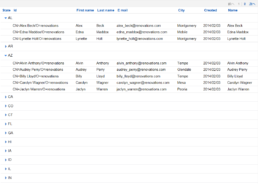
XPages - How to expand a specific category in the view as default
Control Expand/Collapse of the category view
To control Expand/Collapse status of the view in XPages, you just have to use [ExpandLevel] in view data source.
For example, Set "0" to expand, "1" to collapse as default.
Then Is it possible if you want to collapse the view as default except the specific category like below?
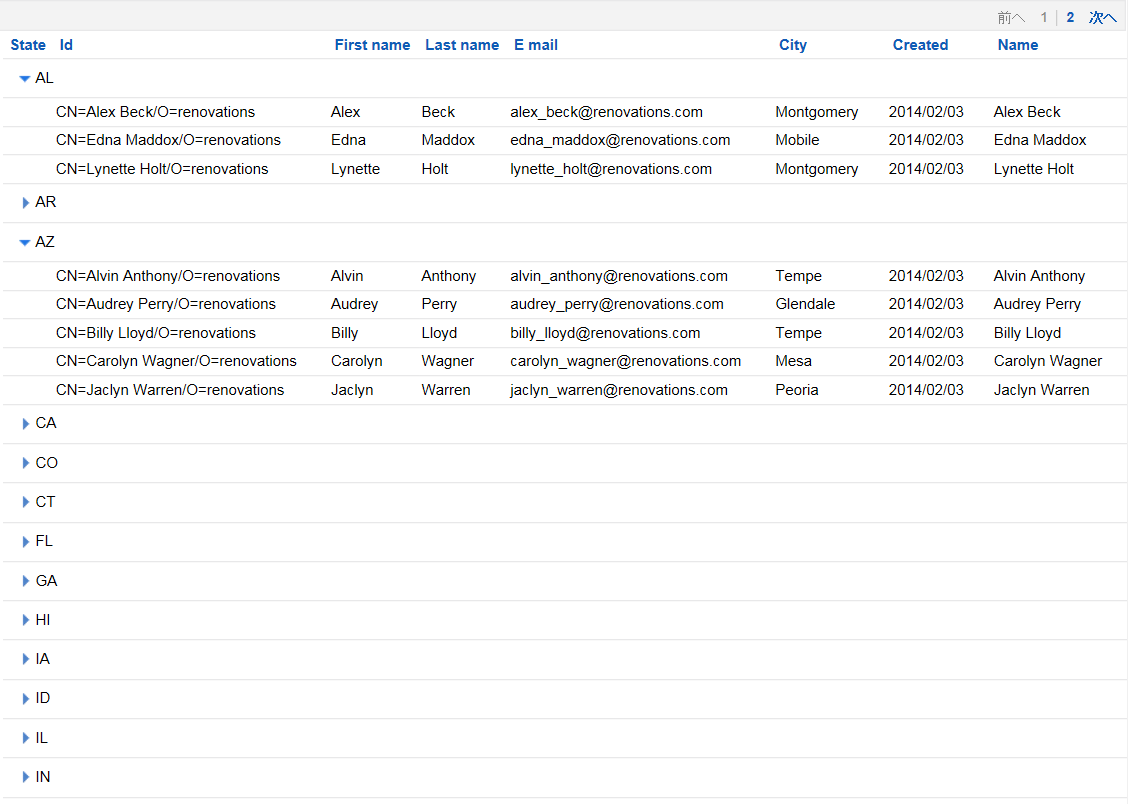
Expand only the specific category as default by SSJS
Use the following Serverside Javascript code in afterPageLoad event to expand the specific category.
[code lang="xml" highlight="4"]
<xp:this.afterPageLoad><![CDATA[#{javascript:var viewPanel = getComponent("viewPanel1");
var model:com.ibm.xsp.model.domino.DominoViewDataModel = viewPanel.getDataModel();
var container:com.ibm.xsp.model.domino.DominoViewDataContainer = model.getDominoViewDataContainer();
container.expand("1");}]]></xp:this.afterPageLoad>
[/code]
In the above case, the last line(L4) specifies the first category to expand.
Like this sample code, you can control more if you use SSJS. In this case, I use DominoViewDataModel object. If you are interested in this object, you can see more detail from this link.
You might be able to get more ideas to control view data source directly.

Honored to be a 2015 IBM Champion for ICS

12/3/2014, I got one email from IBM and title was "IBM welcomes you as a 2015 IBM Champion!".
I am very honored to be an IBM Champion 2015 and now I am feeling I should contribute more to the ICS communities.
From Japan, 6 Japanese were designated for IBM Champions for ICS.
Satoru Abe (NEOAXIS Co.,Ltd.)
Kenji Ebihara (Ricoh IT Solutions Co.,Ltd.)
Mitsuru Kato (Teamstudio Japan K.K)
Kazunori Tatsuki (KTrick, llc)
Masahiko Miyo (ef Co.,Ltd.)
Takeshi Yoshida (SOLXYZ Co.,Ltd.)
Congratulations!!
In 2014, I could meet a lot of great developers and business partners and had a chance to do the business together. I also had chances to join the events as session speaker such as XPagesDay 2014 , IBM XCITE Autumn 2014 , Notes Consortium .
As 2015 IBM Champion・・・
According to the email, It seems that IBM Champion program recognizes individuals who make outstanding contributions to IBM communities in the following ways
- Evangelize and advocate for IBM Collaboration Solutions
- Share knowledge and expertise
- Help grow and nurture the community
- Expand reach across the IBM portfolio
- Present feedback, both negative and positive, in a constructive and professional manner
Personally I would like to contribute the ICS communities so that none IBM related developers become interested in ICS software and development.
I also had chances to work at the IBM user or partner's development office, then I realized there are many companies which develops a lot of great Notes/Domino applications. So I also would like to provide the valuable information to the world from Japan so that people in the world can realize more that there are many great Japanese developers in Japan.
![[A 3]SSJSでも使える!Javascriptでオブジェクト指向プログラミング入門](https://www.ktrick.com/wp-content/uploads/2014/11/Capture-uai-258x147.png)
XPagesDay 2014 「SSJSでも使える!Javascriptでオブジェクト指向プログラミング入門」スライド公開
XPagesDay 2014 (2014/11/18) 【A-3】「SSJSでも使える!Javascriptでオブジェクト指向プログラミング入門」で使用したスライドを公開しました。

XPagesDay 2014 イベントの申込開始!

XPagesDayの熱い二日間が今年もやってきます!
2013年も大成功に終わったXPagesDayが今年もやってきました。
今回は全てオンラインセッションとなっているので日本全国どこからでも参加できるイベントになっています。
当日は、自分も若輩ながらセッションを一つ講演させていただきます。
【A-3】「SSJSでも使える!Javascriptでオブジェクト指向プログラミング入門」
皆様、是非ご参加ください。
日時:
11 月 18 日(火)、19 日(水)の2日間
場所:
すべてオンラインのセッション
主催:
チームスタジオジャパン株式会社
参加費:
無料 / 事前登録制
詳細、申込みはこちらから » http://www.xpagesday.com/xpagesday.nsf/sessions.xsp

2014/10/3、ノーツコンソーシアム 大阪地区研究会にてXPages事例紹介をさせて頂きます。
弊社のソリューションよりNotes/DominoとXPagesを用いたBtoC、BtoB 事例を開発者の方向けにご紹介致します。
当日はご来場の皆様に弊社作成のXPagesサンプルアプリケーションの無料配布を予定しております。
日時: 10月3日(金) 13:00-17:30
場所: IBM大阪事業所
17:00-17:30 次回開催について討議(全員)

来る2014/9/12、XCITE Autumn 2014 セッション(K-2)で講演致します

XCITE Autumn 2014 セッション(K-2)で講演
2014年、春に開催され大盛況だった日本IBMのイベントXCITE。
今回、秋のイベント XCITE Autumn 2014のセッション「XPagesで革新!これからのNotes/Dominoアプリケーションの新常識」(K-2)でIBM 佐藤 淳様と一緒に講演をさせて頂きます。
当日は、弊社のソリューションよりNotes/DominoとXPagesを用いたBtoC、BtoB によるコラボーレーション事例をご紹介致します。
皆様、是非ご参加ください。
日時:
Business Partner Day - 2014年 9月11日(木) 13:00-18:00 (受付開始:12:00)
XCITE Autumn 2014 - 2014年 9月12日(金) 10:00-18:45 (受付開始:9:00)
場所:
ザ・プリンス パークタワー東京
(東京都港区芝公園4-8-1)
主催:
日本アイ・ビー・エム株式会社
参加費:
無料 / 事前登録制
詳細、申込みはこちらから » https://ibm-xcite.jp/
XPagesリッチテキスト CKEditorツールバーをカスタマイズ
XPages リッチテキスト コントロール
XPagesのリッチテキストコントロールはDomino 8.5.2からCKEditorが採用されるようになりました。
デフォルトでのリッチテキスト コントロールは以下の様なレイアウトになります。
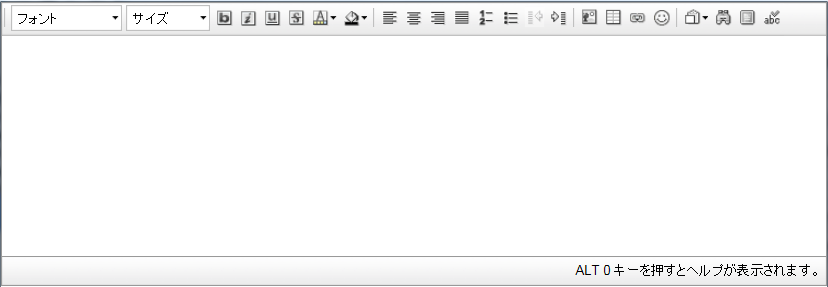
デフォルトでは文字の修飾など基本的なことしか出来ないようになっています。
今回はこのCKEditorをカスタマイズする方法をご紹介します。
toolbarTypeを指定してカスタマイズ
以下の用にDojo属性を追加し、名前を「toolbarType」にし値を指定します。
値には
- Slim
- Medium
- Large
を指定することができます。
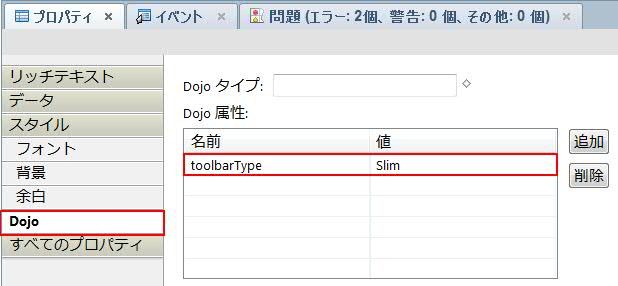
それぞれのレイアウト



Javascriptを使ってフルカスタマイズ
dojo属性に「toolbar」を作り、ツールバーの項目をJavascriptの配列で指定することでリッチテキストコントロールのツールバーをフルカスタマイズすることが可能になります。
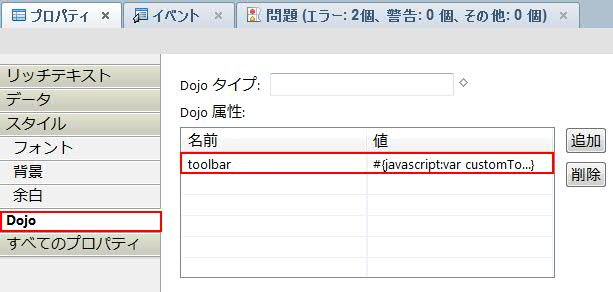
値の部分にサーバーサイドJavascriptでツールバーの項目を以下のようにセットします。
[code lang="js"]
var customToolbar="[['Bold', 'Italic', '-', 'NumberedList', 'BulletedList', '-', 'Link', 'Unlink','-','About']]";
return customToolbar;
[/code]
全てのツールバーの項目を表示させたい場合、
[code lang="js"]
var customToolbar="[['Source','-','Save','NewPage','DocProps','Preview','Print','-','Templates'],"
+"['Cut','Copy','Paste','PasteText','PasteFromWord','-','Undo','Redo'],"
+"['Find','Replace','-','SelectAll','-','SpellChecker', 'Scayt'],"
+"['Form', 'Checkbox', 'Radio', 'TextField', 'Textarea', 'Select', 'Button', 'ImageButton', 'HiddenField'],"
+"'/',"
+"['Bold','Italic','Underline','Strike','Subscript','Superscript','-','RemoveFormat'],"
+"['NumberedList','BulletedList','-','Outdent','Indent','-','Blockquote','CreateDiv','-','JustifyLeft','JustifyCenter','JustifyRight','JustifyBlock','-','BidiLtr','BidiRtl'],"
+"['Link','Unlink','Anchor'],"
+"['Image','Flash','Table','HorizontalRule','Smiley','SpecialChar','PageBreak','Iframe'],"
+"'/',"
+"['Styles','Format','Font','FontSize'],"
+"['TextColor','BGColor'],"
+"['Maximize', 'ShowBlocks','-','About']]";
return customToolbar;
[/code]
のようになります。
このように、フルカスタマイズすることで、今までになかったHTMLソースコードでの編集等も可能になります。
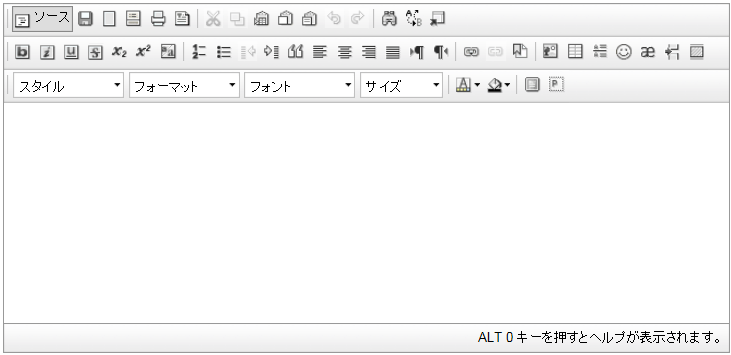
CKEditor 3.X Developer's Guide も参考にしてください。